Background Work, Notifications and Approvals
A search has a lifetime, and some things outlast it: a sandbox detonation that takes minutes, a question only a human can answer, a result someone should hear about without watching a dashboard for it. These three all work the same way -- start something, and come back to it later -- and all three show up in the same place: the Activity view, alongside the editor in Splunk Web's own navigation.
Background Tasks
task.start runs a saved function once, detached from the search that
started it, and returns immediately with an id:
from babysoarus_exec import task

def process(events):
    for e in events:
        if e.get('needs_detonation'):
            e['task_id'] = task.start('response/detonate_url', [{'url': e['url']}])
            e['status'] = 'detonation queued'
    return events
The function it names is an ordinary saved function -- def process(events),
the same shape as every other one, addressed the same way | exec function= addresses it. There is no separate "task function" shape to
learn; task.start's second argument plays the role a search's own batch
would, so it is a list of events, not an arbitrary object:
# functions/private/response/detonate_url.py
def process(events):
    for e in events:
        e['verdict'] = 'benign'  # a real sandbox call goes here
    return events
A later search (or another task) checks on it:
from babysoarus_exec import task

def process(events):
    for e in events:
        result = task.result(e['task_id'])
        e['task_status'] = result['status']  # queued, running, done, error, cancelled
        if result['status'] == 'done':
            e['verdict'] = result['result'][0]['verdict']
    return events
task.status(id) reports the same states without the result payload, for
polling that does not need it yet. task.cancel(id) asks a still-queued task
to stop -- best effort, and only while it has not already started.
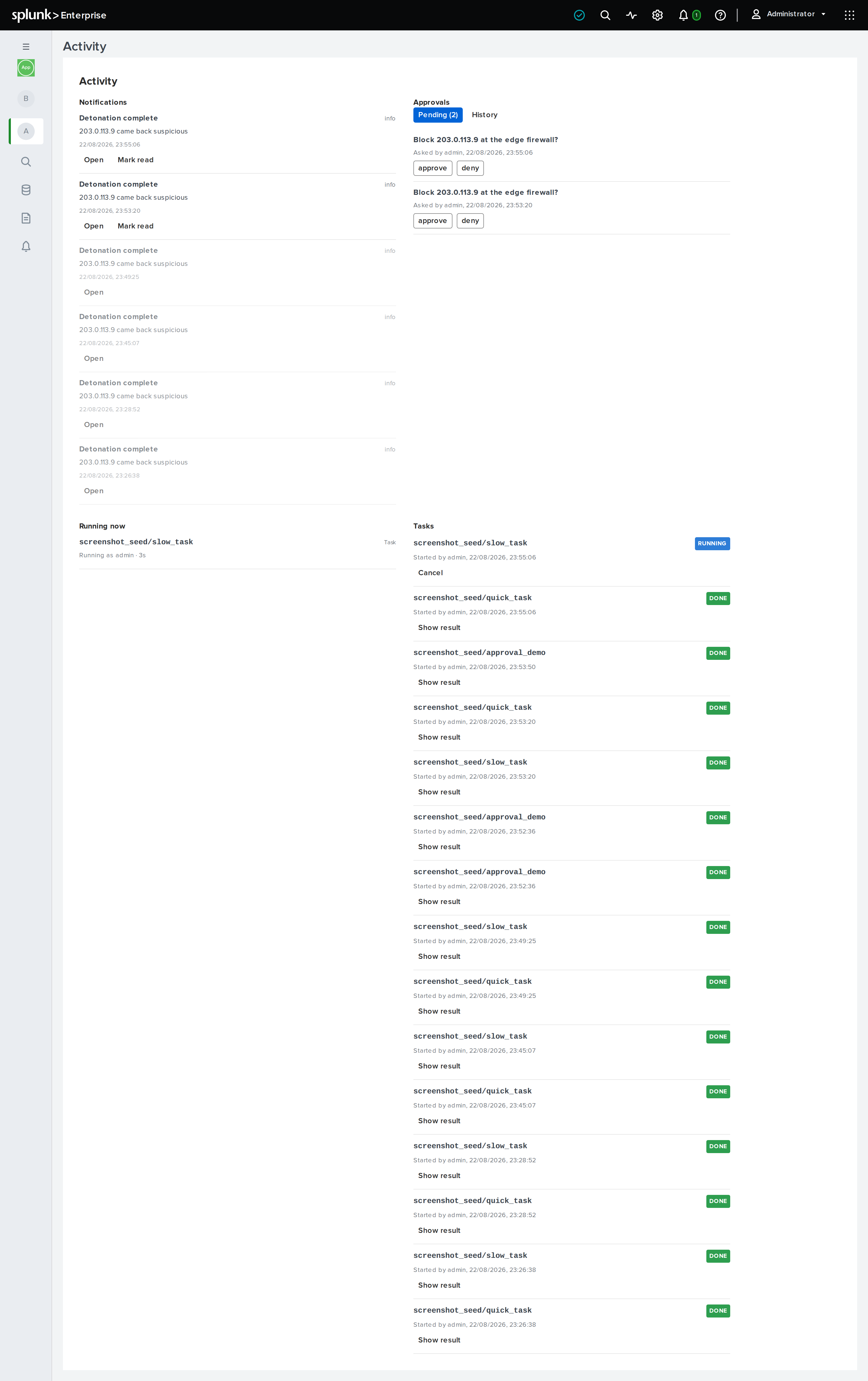
Every task is also in the Tasks panel, in Activity:
who started it, what it ran, its current state, and its result or error once
it has one -- a real audit trail, not something you have to build yourself
out of task.status calls. It shows every task on this cluster member, not
just the ones you started, sorted newest first, with a Cancel button on
anything still queued or running.
What Is Running Right Now
Tasks are not the only thing Activity shows live. Running now lists
every invocation currently executing on this cluster member -- an ordinary
search's exec function= or exec inline=, not only a background task --
with who is running it and how long it has been going. It updates every few
seconds, and a run drops off the list the moment it finishes; there is
nothing to clean up and nothing kept once a run ends, since the Tasks
panel above is already where a background task's
history lives.
This is per cluster member, not cluster-wide: each daemon reports only what its own process is executing right now, the same limit background tasks already have on where a task actually runs.
Notifications
notify tells a specific person something, without them needing to be
watching a search:
from babysoarus_exec import notify

notify('soc-lead', 'warn', 'Detonation complete',
       f'{url} came back {verdict}', deep_link='response/detonate_url')
severity is critical, error, warn, info or debug. deep_link is
an app-relative path -- typically a function name -- that Activity's
Open button navigates to. A notification addresses one username, not a
role: point it at a person, or a small distribution of calls at several.
Approval Gates
prompt.ask is the third mechanism in this family -- asking a human a
yes/no (or multiple-choice) question without blocking the search that asks
-- covered in full, with a worked containment example, in Response
plans.
The Activity View
Notifications, pending approvals, what is running right now, and the task manager all live on their own page, Activity, in Splunk Web's own navigation next to the editor -- not tucked into whichever function happens to be open, since none of the four are about that. It polls rather than pushes (Splunk offers an app no server-push channel), so a new notification, approval request or task update shows up within moments, not the next time someone happens to reload. Running now polls faster than the rest, since it exists to feel close to real-time.
Notifications list newest first, read ones fading rather than disappearing -- the list is its own history, with nothing separate to check for what already happened. Approvals show what is waiting on you, who asked and when, with a button per option; once answered, a prompt moves from Pending to a History tab that persists across every prompt you have ever answered, not just the most recent one. Running now is the live view described above. Tasks is the audit trail described above -- every task on this cluster member, its owner, its state, and its result on demand.