Custom WebAssembly Functions
- When to Compile
- The Contract
- A Worked Example
- State and Pooling
- Other Languages
- Legacy Modules Are Not Supported
- Saved Python Functions
- Hot Reload
- Testing
When a snippet is stable, hot, or too big for the search bar, compile it.
A custom function is a WebAssembly component you drop into
functions/public/. It becomes callable before your next search, with no
restart, and runs many times faster than the interpreter -- a factor
make bench in Performance
will put a number on for your own hardware.
index=web | exec function=enrich.wasm
When to Compile
| Use inline Python | Use a compiled function |
|---|---|
| Exploring, hunting, iterating | Logic that has settled |
| A few lines | A few hundred lines |
| Anything you will change today | Anything under change control |
| Interpreter throughput is plenty | You are counting microseconds |
| Standard library is enough | You want a real dependency tree |
Most detections never need compiling. Reach for it when the logic deserves a test suite and a code review.
The Contract
Three exported functions, defined in wit/exec.wit:
export begin-run: func(code: option<string>) -> result<_, string>;
export execute-batch: func(batch-json: string) -> result<string, string>;
export end-run: func() -> result<_, string>;
execute-batch receives a JSON array of event objects and returns a JSON
array of event objects. Return fewer to filter, more to expand.
The host offers three imports: splunk-request, get-lookups-dirs and
get-run-context. General outbound HTTP is not one of them: it is
wasi:http/outgoing-handler, which the world also imports, so your requests
are subject to the network policy the daemon configures.
A Worked Example
The app ships this example compiled, as functions/public/example.wasm.
Here is the complete implementation it was built from:
wit_bindgen::generate!({ path: "../../wit", world: "exec", generate_all });

use crate::babysoarus::exec::host;
use std::cell::RefCell;

struct Component;
export!(Component);

#[derive(Default)]
struct RunState {
    seen: u64,
    started: bool,
}

thread_local! {
    static STATE: RefCell<RunState> = RefCell::new(RunState::default());
}

impl Guest for Component {
    fn begin_run(_code: Option<String>) -> Result<(), String> {
        STATE.with(|s| *s.borrow_mut() = RunState { seen: 0, started: true });
        Ok(())
    }

    fn execute_batch(batch_json: String) -> Result<String, String> {
        let mut records: Vec<serde_json::Map<String, serde_json::Value>> =
            serde_json::from_str(&batch_json).map_err(|e| e.to_string())?;

        for record in &mut records {
            let seen = STATE.with(|s| {
                let mut s = s.borrow_mut();
                s.seen += 1;
                s.seen
            });
            record.insert("babysoarus_seen".into(), seen.into());
        }

        serde_json::to_string(&records).map_err(|e| e.to_string())
    }

    fn end_run() -> Result<(), String> {
        STATE.with(|s| s.borrow_mut().started = false);
        Ok(())
    }
}
Build it:
cd components/babysoarus-guest-example
cargo build --release --target wasm32-wasip2
cp target/wasm32-wasip2/release/babysoarus_guest_example.wasm \
   "$SPLUNK_HOME/etc/apps/babysoarus/functions/public/enrich.wasm"
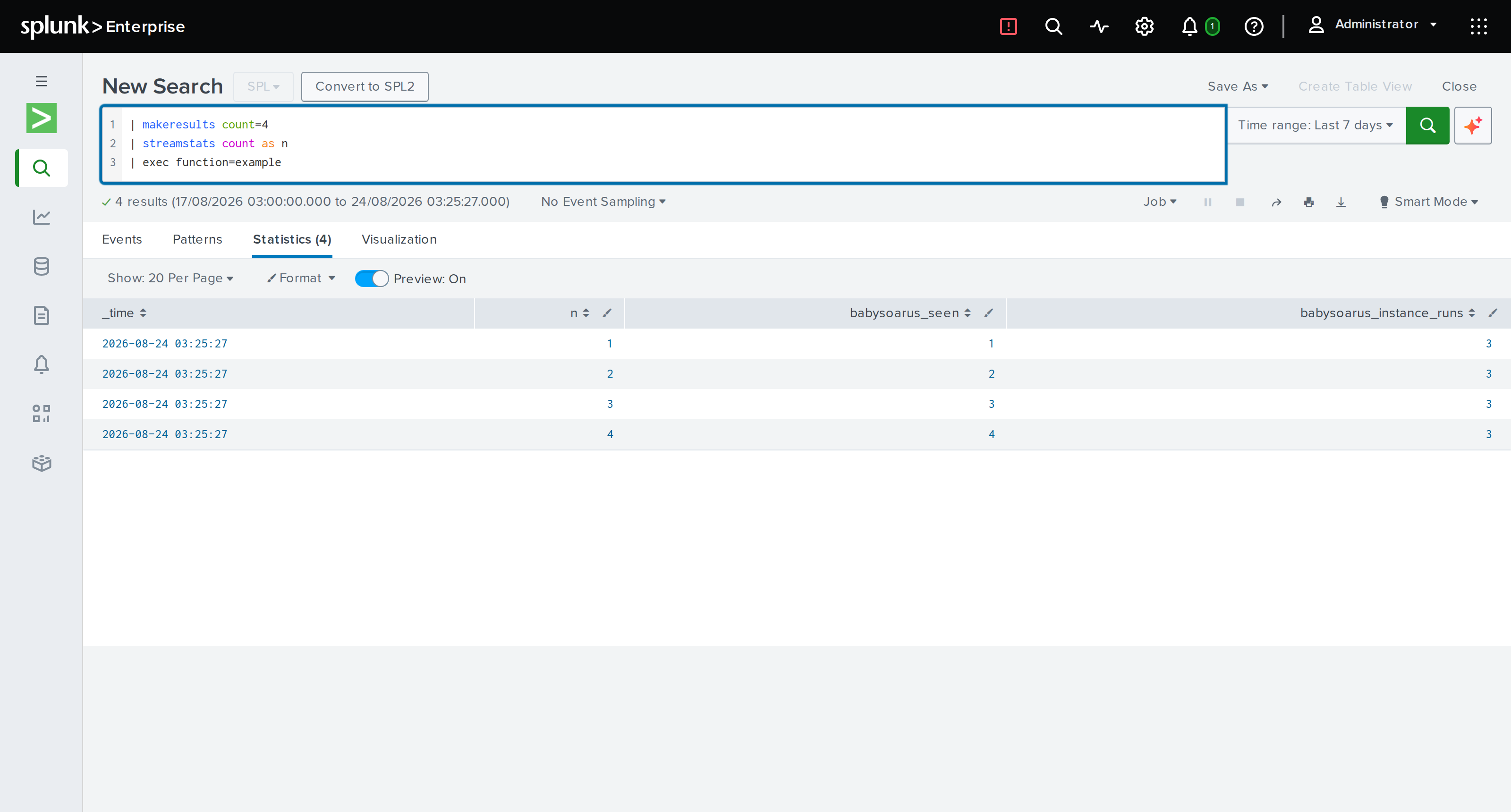
Call it:
| makeresults count=4 | streamstats count as n | exec function=enrich
State and Pooling
Instances are pooled and reused across unrelated searches. That is what makes them cheap, and it shapes how you should write them.
Per-run state belongs in begin-run and must be cleared in end-run.
Anything a search puts there must not leak to the next search.
Instance state survives across runs and is exactly where the value is. Compiled regular expressions, parsed lookup tables, prepared automata: build them once, on first use, and every later search reuses them for free.
thread_local! {
    // Built once per instance, reused by every search that instance serves.
    static PATTERN: regex::Regex = regex::Regex::new(r"(?i)cmd\.exe\s+/c").unwrap();
}
If a call traps, the host discards that instance rather than returning it to the pool, because guest globals could be in any state. You do not need to handle that yourself.
Other Languages
Any toolchain that targets the component model works.
Rust with wit-bindgen and the wasm32-wasip2 target, as above. No
cargo-component needed on recent Rust.
Python with componentize-py, which is how the bundled interpreter is
built. Useful when you want the deployment story of a compiled function but
the ergonomics of Python.
Go with TinyGo and wit-bindgen-go.
JavaScript with ComponentizeJS.
C and C++ with wasi-sdk and wit-bindgen.
There Is No Upload Button
Whatever the toolchain, the result is one .wasm file, and there is
deliberately only one way it gets into BabySOARus: copy it into
functions/public/ or functions/private/ on the app's own filesystem, the
same way the worked example above does with cp. The browser editor's Save
button is for the Python source it edits, not for a compiled binary -- a
component you built elsewhere reaches the daemon through the same deployment
path as the rest of the app: a Git checkout, splunk install app, a config
management push, whatever already puts files on this Splunk instance. Once
the bytes are on disk, hot reload below picks it up with no
restart, exactly like any other file change.
Legacy Modules Are Not Supported
Plain WASI Preview 1 core modules, including anything exporting a raw
process(ptr) -> ptr C ABI as described in this project's older example
documentation, will not load. Rebuild against a component-model target.
This is deliberate. Supporting Preview 1 means carrying an adapter module in every instance, which costs memory in the pool and adds a compatibility surface with its own bugs. Every component here is a genuine Preview 2 component backed by a single core instance.
Saved Python Functions
Most saved functions are written in the editor, in Splunk
Web, not by placing a file on disk directly. The two are the same thing
underneath -- a saved function is still a .py file in functions/public/
or functions/private/, callable the same way a .wasm component is: writing
the file straight to disk (a deployer's Git checkout, a bulk import) is the
right path for those cases, and everything below still applies to it exactly.
index=auth | exec function=detections/password_spray min_users=8
The file defines process:
# functions/public/detections/password_spray.py
def process(events, params):
    threshold = int(params.get('min_users', '5'))
    for e in events:
        e['over'] = int(e['count']) > threshold
    return events
params is optional. Write def process(events): when you do not need
it; both signatures are accepted.
Return a list to replace the batch, or return nothing having changed
events in place. This is the same rule an inline snippet follows.
Sharing Code Between Functions
A file without a process is an ordinary module. Import it from any other
saved function:
# functions/public/lib_scoring.py
def score(value):
    return len(str(value)) * 10
# functions/public/detections/password_spray.py
import lib_scoring

def process(events):
    for e in events:
        e['score'] = lib_scoring.score(e['user'])
Calling a module that has no process as a function reports exactly that,
rather than failing obscurely.
Names Are Paths
A function is named by its path under the functions directory with the
extension dropped, so functions/public/detections/password_spray.py is
function="detections/password_spray". Folders are how you organise a
library; two functions of the same name in different folders are distinct.
Names use forward slashes, and a name that would point outside the functions directory is refused.
When Two Files Share a Name
Functions live in three layers. In increasing precedence: functions/library/,
the read-only detections shipped with the app; then functions/public/; then
functions/private/. A name claimed in more than one layer resolves to the
highest, so your own copy of a shipped detection replaces it without your
having to rename anything. Within a single layer, a .py beats a .wasm of
the same name.
Overriding a shipped detection is the point of that ordering, so a collision is reported rather than refused. The daemon logs every name more than one file claims, saying which one runs and which are inert, and the editor's file list marks a saved function that shadows a library entry. Worth knowing when an upgrade adds a detection whose name you were already using: yours keeps running, and the new one will not.
Editing Takes Effect Immediately
Save a file and the next search uses it. No restart, and no need to think about which warm interpreter served the last search. That applies to helper modules too, not just the function you called.
Hot Reload
The daemon watches functions/public/ and functions/private/.
- Adding a
.wasmfile makes it callable without a restart. - Replacing one swaps it atomically. Searches already running finish against the old code; new searches get the new code.
- Deleting one makes it stop resolving.
- Touching one without changing its bytes does nothing, because reloads are guarded by a content hash. Editors that rewrite files harmlessly are harmless.
Compiled artefacts are cached by content hash under var/cwasm/, so
reinstalling a component you have used before skips compilation entirely, even
across daemon restarts.
Testing
Test the component directly, with no Splunk in the loop. BabySOARus's own
test suite does exactly this to the shipped example: load the component, call
begin-run, feed it batches, assert on what comes back. Your harness can be
as small as a script that does those three things.
That is the real advantage of compiling. A detection becomes a unit test.